In most RMC applications that use force limit mode, the force must be limited to a positive value, and must be limited in the direction of increasing force. This means that the force should not exceed that positive value. This works well for systems that first move in position control, then encounter a resistive force, and the force needs to remain below a certain value to prevent damaging the object being pressed.
Force limit is more challenging on systems where the force must be limited to a positive value in the direction of decreasing force, that is, the force should not go below a certain value. One example of such a system is an upward pointing cylinder that is holding a load, where retracting will allow the load to rest upon external supports, offloading the cylinder, but it is desired that the cylinder still maintain a certain force so that the load is not putting its full weight on the supports.
To limit force to a positive value in the decreasing direction:
- Set the Target Force to a negative value
Send the Ramp Target Force (Linear) (42) command to set the Target Force to a negative value. - Set the Force Limit Mode to Negative
Send the Set Prs/Frc Limit Mode (40) command, with the Prs/Frc Limit command parameter set to Negative.
This works because the Negative force limit mode works on the negative value of the Target Force, and works to keep the Actual Force above that value. The negative of a negative value is a positive, so setting the Target Force to a negative value means the force limit mode is working to keep the force above a positive value.
Here is a plot demonstrating this:
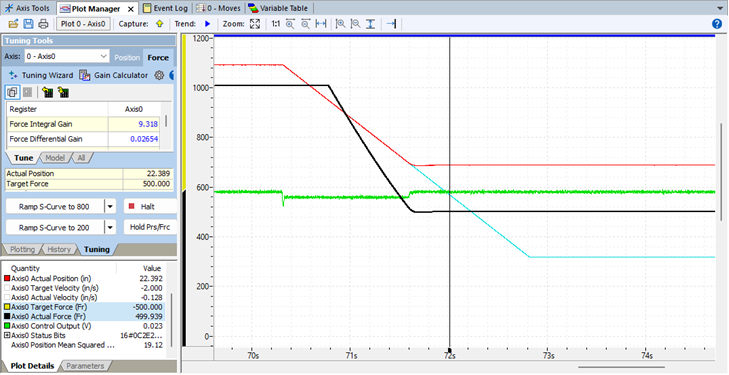
Notice in the Plot Details window that the Target Force is -500. The Target Position starts at a high value, and moves in the decreasing direction. As the Actual Force approaches 500, it is limited, which is also evident by the Actual Position coming to a stop.
For comparison, below is a plot of a normal force limit situation, where the force is limited to a positive value in the increasing direction, that is, the force should not exceed that positive value. This was achieved by setting the Target Force to 500 and setting the force control mode to Positive.
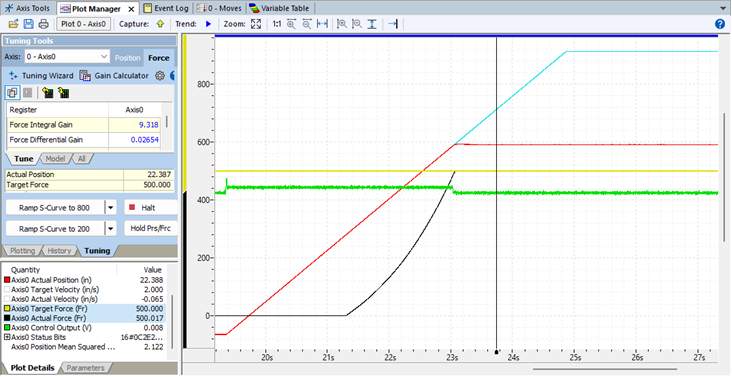
In this plot, the Target Force is 500. The Target Position starts at a low value and moves in the increasing direction. As the Actual Force approaches 500, it is limited, which is also evident by the Actual Position coming to a stop.
Keep in mind that the RMC’s force limit has great flexibility beyond that demonstrated in these examples. The direction of force relative to position can be changed, and force can be limited to positive and negative values. The Target Force can be controlled on the fly, as well - it doesn’t need to be a static value.