The Situation:
Using the MSG instruction in Allen-Bradely PLCs to write large blocks of data to the RMC.
The Problem:
With SLC and PLC-5 Typed writes, large writes are broken up into smaller writes, so the data is not processed at the same time in the RMC. For example, when writing commands to many axes simultaneously, the write may be broken up, leading to problems in processing the commands correctly.
The Solution:
Use a CIP Generic Service to write blocks of data up to 986 elements (32 bits) without being broken up. This involves creating a User-Defined Data Type (UDT) and configuring the MSG instruction as described in the Step-by-Step Instructions below.
Max Write Length:
- RMC200 Firmware 1.19.0 and newer: 986 REAL elements. This ensures the total packet size (3950 bytes) remains under the CIP Large Connection limit of 4002 bytes.
- RMC200 Firmware older than 1.19.0: 122 REAL elements.
Step-by-Step Instructions:
1. Define a UDT in Studio 5000
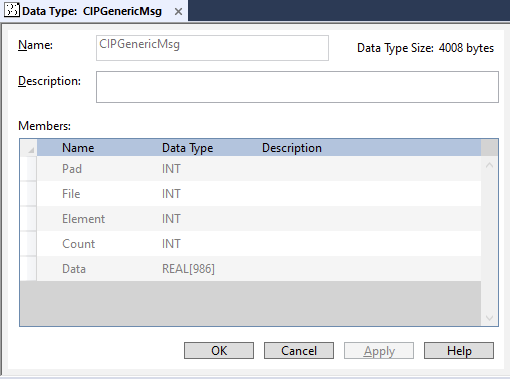
Create a UDT named CIPGenericMsg with the following structure:
- Pad (INT): This is not used for data, just for internal alignment of the data.
- File (INT): The File portion of the address of the write location in the RMC’s. This uses the RMC’s internal IEC address in the form %MDfile.element. This does NOT use the DF1 (Allen Bradley) Address Maps.
- Element (INT): The Element portion of the address of the write location in the RMC’s. This uses the RMC’s internal IEC address in the form %MDfile.element. This does NOT use the DF1 (Allen Bradley) Address Maps.
- Count (INT): The number of 32-bit elements to write (must be ≤986).
- Data (REAL[986]): Array for the data. The size of the array must be equal to or greater than the number of elements to be transmitted.
2. Create a Message (MSG) Instruction
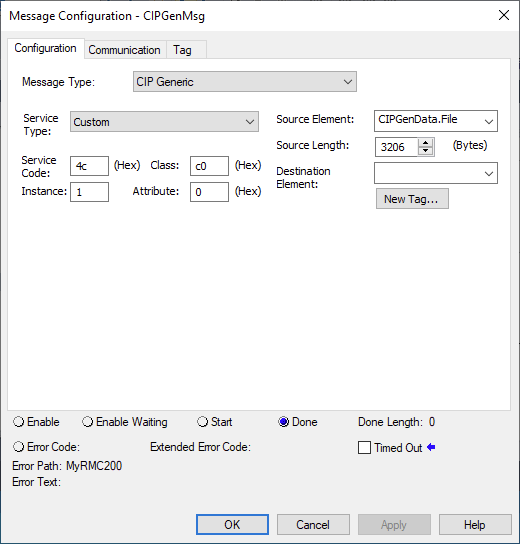
Set the MSG instruction to CIP Generic with the following parameters:
Parameters:
- Service Code: 4c (Hex) — Write Registers LE.
- Class: c0 (Hex) — RMC Register Object.
- Instance: 1.
- Attribute: 0 (Hex).
- Source Element: CIPGenData.File
3. Calculate the Source Length
The Source Length in the MSG instruction must precisely match the number of bytes being sent. Since the message starts at the File member, the length includes the 3 header INTs (6 bytes) plus the data.
Use the following formula to determine your Source Length (in bytes) based on your Count:
SourceLength = 6 + (Count × 4)
Example: For a Count of 800 REALs, the length is 6+(800×4)=3206 bytes.
4. Enable Large Connection for large writes
To write more than ~120 elements in a single packet, Large Connection must be enabled on the Communication tab:
- Ensure that the Connected box is checked.
- Check the Large Connection box.
- This requires RMC200 Firmware 1.19.0 or newer.