Integrator Limit

Limiting the integrator term can prevent overshoot in systems where the Actual Position is not following the Target Position very well. While the RMC75, 150, and 200 do not have a built-in integrator limit, there is a way to do so in user programs.

Attached below is an RMCTools project with user programs that demonstrate how to limit the integrator by turning it on and off based on the current integral term and the sign if the position error. This approach was suggested by a customer, Richard Watson.

In general, it is best to first try to design the system well. In a well-designed system with a well-behaved load, the Actual Position follows the Target Position well and there is no need for limiting the integrator. However, plenty of real-life situations exist where the Actual Position cannot follow the Target Position well, causing the Integral Term to wind up or down, which usually results in overshooting or undershooting the final commanded position.

The RMCs support various other integrator-related features, such as automatically turning it off during a move, and automatically turning it on once the move completes, which also helps reduce overshoot. Limiting the integrator adds another tool to the toolbox.

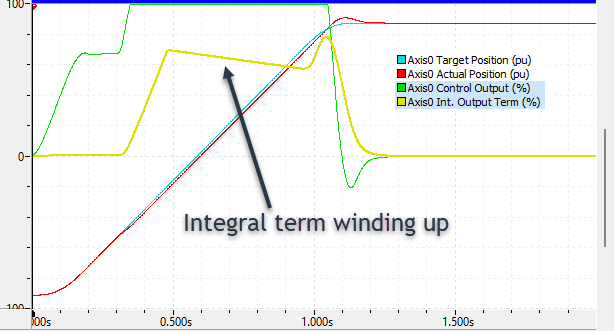
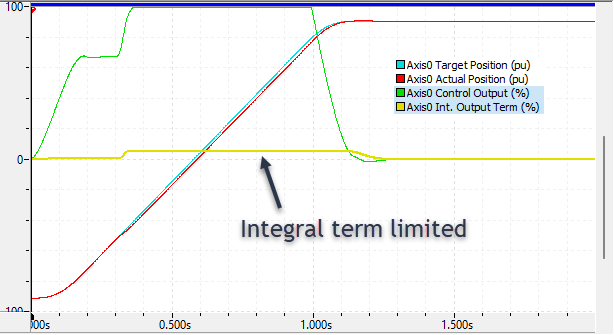
The plots below show a motion with a disturbance. Without the limiting, the Integrator winds up a large amount, which results in overshoot of the final commanded position. With the limiting, the Integrator winds up very little, and there is much less overshoot of the final commanded position.

Without Integrator Limiting:
With Integrator Limiting:
Example Project for Integrator Limit:
IntegratorLimit.rmcproj (24.3 KB)

If you try this and it works for you, let us know!

1 Like

We had a challenging application to move a model on the end of a robotic arm in our test facility. It had to move fast, but also hit its mark precisely. After a lot of hydraulics tuning we still had an issue that while boosting the integral term would help keep the arm following the desired trajectory, the term would wind up and cause undesired overshoot and oscillations (“hunting”) at the end of travel. A powerful, but simple, solution was to use the Integrator Adjust (70) command to zero out the Integral Output term when we had completed the Move command and detected that we were near enough to the target stop position. This immediately nullified the wind-up that built up over the move and effectively shut off flow (the Feed-Forward term goes to zero at the end of the trajectory and the Proportional term was minimal), which resulted in our arm hitting its target precisely with no overshoot. It even allowed us to tighten up our gains to better track the move trajectory.

Thanks for sharing that, Jeffrey! It’s rare for us to hear of anyone manipulating the integrator with the Integrator Adjust command. When zeroing the integrator, was there an abrupt change in motion, or was it smooth?
-Jacob

The goal was to only fire the Integrator Adjust = 0 command when the model was basically stopped at the end of the trajectory (target velocity and acceleration = 0) and was within the small allowable error from the target final position, so it was not a significant impact to the motion of the model, but if you were expecting a heavily damped oscillation at the end of travel, the absence of motion was a little unnerving, like the arm had been stopped by soft clay..