Superimposed motion can be performed as follows::
- Define axes:
a. Define the main control axis as usual.
b. Define virtual axes - one for main axis motion and one for each level of superimposition on top of that. - Sum the Target Positions:
Create a continuously running user program that sums the Target Position of all the virtual axes and place the sum in a variable. - Gear the main axis to the variable, using the Gear Absolute command.
- Make moves as desired on the virtual axes.
This plot shows superimposed motion consisting of a main motion, with 2 levels on top of that. The red line is the full resulting motion. The blue, yellow, and gray lines are all the components that make up the full motion.
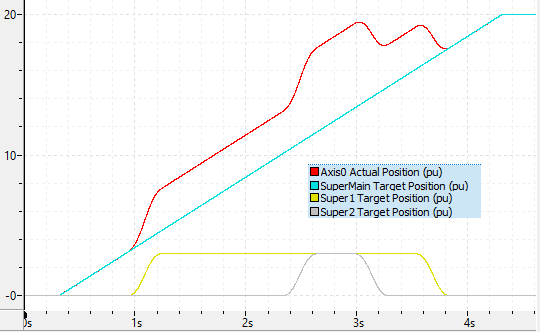
The attached RMCTools project and plot demonstrate this.
SuperImposedMotion.rmcproj (29.8 KB)
Superimposed Motion 2 levels on top of main.rmcplotx (116.6 KB)